info@orbitmediasolutions.com

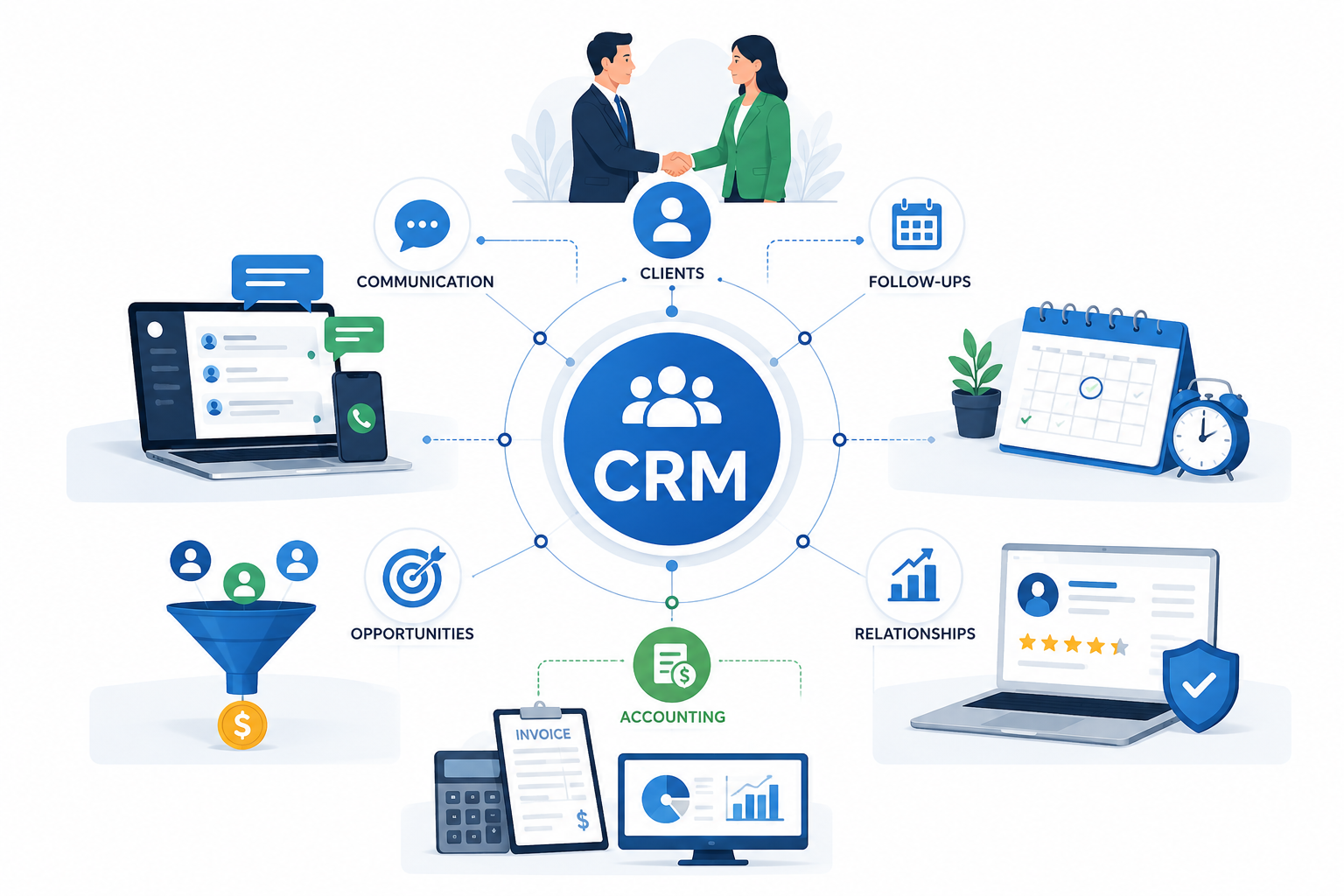
Customer relationship management (CRM) is the strategy and software used to manage interactions with customers and prospects, improving relationships and growing revenue — replacing scattered spreadsheets and separate inboxes with one shared source of customer data.
Every contact, email, call note and order sits in one CRM tool, not scattered inboxes—nothing's lost when staff leave.
Contact management goes beyond a name and number, bringing together communication history, purchases, deals, and tickets into a single profile.
A CRM breaks down the wall between departments — marketing, sales and support all work from the same record.
Cloud-based CRM stores data securely off-site, accessible from any device, with no hardware to maintain.
When a sales rep receives a website enquiry, CRM software for UK businesses records the contact, assigns the lead and creates the next follow-up. Instead of relying on inboxes, your team can use contact management, lead management and a clear sales pipeline to move each opportunity forward.
Lead management captures inquiries from your website, email and phone, then scores them so sales can focus on the best fits.
Contact and deal management link contacts to their companies and the opportunities in progress.
A sales pipeline gives a stage-by-stage view of every deal, so nothing slips through.
Every call or meeting can be logged as an activity, building a record of what's done and due next.
Lead management, contacts and the pipeline form one journey, from qualified lead to closed deal.

Manual follow-ups are where good deals often get lost. Our CRM software uses sales automation and workflow automation to assign leads, schedule tasks and remind your team what to do next. With lead management, email integration and a clear sales pipeline, every opportunity stays visible. This helps UK businesses respond faster, manage deals better and keep customer relationships moving forward.
New leads can be automatically routed to the right salesperson, so inquiries don't go unassigned.
Workflow automation can trigger a reminder the moment a deal goes quiet.
Routine emails and tasks — a quote follow-up, a renewal reminder — can run automatically once a deal reaches a stage.
Automation cuts repetitive admin like logging calls by hand, one of the most time-consuming parts of a manual CRM.
Reminders, workflows and clear ownership keep deals active rather than stalled.

You cannot manage what you cannot see. A CRM dashboard turns customer data, sales activity and deal progress into clear insights. Track your sales pipeline, review reports and analytics, and use sales forecasting to spot opportunities, follow up faster and make better business decisions.
See where your best leads come from — forms, referrals, campaigns — and which sources actually convert.
Reports show the total value in your pipeline, broken down by stage, team member or product.
CRM analytics surface how many calls and meetings each team member logs, spotting bottlenecks early.
Because the dashboard updates as deals move, managers get current information, not last month's snapshot.
Sales forecasting uses pipeline data to project revenue — accuracy depends on consistent data entry.
CRM software is not only for managing sales. A shared customer view gives your customer support team access to contact details, previous conversations and deal history in one place. With customer service automation, workflow reminders and email integration, teams can respond faster, provide clearer support and build stronger customer relationships after the sale.
Support staff sees every previous email, call and ticket before responding instead of asking customers to repeat themselves.
Support tickets can be logged and tracked in the same platform that holds the sales history.
Clear task ownership means enquiries get picked up quickly rather than left sitting in a shared inbox.
A complete record of past interactions supports more informed conversations, linked to stronger retention.
Customer retention management software uses the same history to flag renewal dates and prompt timely check-ins.

CRM works best when it is not a standalone contact list sitting apart from your business. Connect customer data, lead management, sales pipeline activity and email integration with marketing automation, accounting and customer support. This gives your team one clear view of each customer, reduces repetitive work, and helps sales, service, and operations make faster, better-informed decisions.
CRM sits at the centre of sales management — pipeline, deals, and forecasting, all together.
Marketing automation can use CRM data to segment your audience by interest.
Email integration syncs your inbox, automatically logging messages to the right contact.
Linking CRM with accounting means a won deal flows straight to billing without re-entering details.
CRM data can connect with helpdesk and project tools, giving every department the same context.
Website forms and e-commerce orders can feed directly into the CRM as new leads.
CRM is typically a single module within a connected ERP setup, alongside finance, HR, and inventory. Orbit Media Solutions covers this on our Smart Business Solutions / ERP page.

You do not need enterprise complexity to get value from a CRM—just a CRM tool your team will use daily. Manage customer data, contacts, leads and sales pipeline stages in one place. Simple workflow automation, CRM dashboards and reports help UK small businesses stay organised, follow up faster and make better decisions.
A basic CRM removes the version-control headaches of shared spreadsheets with one always-current system.
Even a small team benefits from defined pipeline stages, so everyone follows the same process toward a close.
Cloud-based customer management lets the team access records securely from anywhere.
A platform that starts simple should add users and depth as you grow, rather than forcing a system change later.
Role-based permissions mean staff, managers and partners see only what's relevant to them.
The best CRM for small-business UK operations prioritises usability, automation, reporting, security, and the ability to scale without unnecessary complexity.
Client-based firms need more than a basic CRM. Our CRM software helps accounting and professional service teams manage customer data, client contacts, lead management and deal progress in one place. Use email integration, workflow automation and customer insights to track enquiries, organise follow-ups and build stronger long-term client relationships.
New enquiries — bookkeeping, payroll, advisory work — can be tracked from contact to signed engagement.
A full history of calls and meetings means any team member can step in without starting from scratch.
Recurring deadlines, like filing dates or reviews, can be scheduled as tasks on the right client record.
Linking client records between the CRM and your accounting package avoids duplicate entry.
A connected view of client history supports better-timed check-ins around renewals.
CRM software for accounting firms isn't about replacing your accounting package — it's a clear, shared record of every client relationship. For firms comparing the best CRM software for accountants, the priority is reliable tracking and secure data access, not flashy features.

Storing customer data in a CRM brings legal responsibilities, not just operational benefits.
Access controls restrict who can view or edit records, limiting exposure if an account is compromised.
Keeping records in one platform, not scattered devices, reduces where sensitive data could be lost.
Cloud-based CRM providers typically run backups and security measures costly to maintain on your own hardware.
Different teams can have different access levels, so a support agent can't see sensitive deal values.
Any UK business that holds personal data — including ordinary contact details — is subject to the UK GDPR and the Data Protection Act 2018, regardless of size. A CRM with role-based access supports your data protection processes, but doesn't alone make a business compliant — worth confirming with the ICO.

No two UK businesses sell the same way, and a good CRM should bend to fit your process.
Define pipeline stages that match how your business actually sells, not a generic template.
Capture details that matter — a renewal date, a property type — alongside standard fields.
Sales, marketing and support can each have automation suited to how they work.
Build reports around the metrics that matter to your business, not just what's pre-built.
A CRM that connects with the tools you already use reduces the friction of adopting something new.
UK SMEs don't want to overhaul their way of working just to fit rigid software — the CRM should adapt to the business.
A CRM only delivers value if your team actually uses it, so a simple interface matters as much as the feature list.
The platform supports the full relationship — pipeline, service and account management together.
Whether replacing spreadsheets or adding structure as you grow, the platform scales with you.
As an Odoo ERP partner, Orbit Media Solutions builds CRM as part of a connected system alongside finance, HR and inventory.
Orbit Media Solutions has delivered business software to UK businesses since 2018, with UK-based support.
See how your team can manage leads, automate follow-ups and build stronger relationships with one connected CRM platform.
Salesforce is the most widely used CRM platform globally, holding around 20–21% of the market per IDC's 2025 tracker — though it's built mainly for large enterprises, while most UK small businesses choose simpler, cheaper tools.
For beginners, Odoo CRM is often the best choice for businesses that need a simple CRM that can grow into a full ERP system. Its visual pipeline makes it easy to track leads, manage opportunities, schedule follow-ups, and view forecasts. As needs grow, you can customise Odoo and connect sales, accounting, inventory, and more.
The four types of CRM are operational, analytical, collaborative, and strategic CRM. Operational CRM automates daily sales, marketing, and customer service tasks. Analytical CRM turns customer data into useful insights. Collaborative CRM helps teams share customer information. Strategic CRM focuses on building long-term customer loyalty. Modern systems such as Odoo ERP can combine these functions on a single platform.
Yes. This CRM is suitable for small UK businesses that need a single platform to manage contacts, leads, sales, emails, and customer support. It can reduce manual work and improve follow-ups as the business grows. Choose a plan with the features you need and ensure it supports UK GDPR data security requirements.
Yes. This CRM software can work well for accounting firms by keeping client details, emails, documents, leads, and follow-ups in one place. It helps your team track new enquiries, manage service pipelines, automate reminders, and connect with accounting tools for smoother client communication and billing workflows.
Yes. Odoo CRM includes lead management and sales pipeline tracking. You can capture leads, convert them into opportunities, assign them to sales teams, and move deals through custom stages. This gives your team a clear view of every prospect, follow-up, and potential sale.
Yes. Cloud-based customer management can be secure when the provider uses encryption, secure data centres, access controls and regular security monitoring. However, security is shared: your business must also use strong passwords, multi-factor authentication and proper user permissions.
Yes. Odoo CRM can be customised to match your exact sales process. You can create or rename pipeline stages, add custom fields, set follow-up activities, assign sales teams, and automate actions. This helps your team manage leads, deals, and approvals in a way that fits your business.
An Odoo CRM implementation usually takes 4–12 weeks when using standard features and clean data. Custom workflows, integrations, data migration, user training, and approval delays can extend it to 3–6 months. A reliable timeline should be set only after reviewing your processes, requirements, and existing data.
Copyright © 2026 Orbit
Choose which cookies we may use. You can change this at any time. Read our Cookie Policy.
Needed for the website to work (security, forms, remembering your cookie choice). Always on.
Remember choices you make, such as language and light/dark mode.
Help us understand how visitors use the site (for example Google Analytics), so we can improve it.
Used to measure our adverts and show you relevant ads on other sites (for example Facebook / Meta Pixel).